Stopping Multi-Cluster Drift: ArgoCD vs Flux


Table of Contents
Running multiple Kubernetes clusters is easy. Keeping them consistent is hard.
As organizations grow, they accumulate clusters: dev, staging, production, regional deployments, edge locations, disaster recovery. Each cluster starts as a copy of the others, templated from the same base configuration. A platform team I worked with managed 15 clusters across dev, staging, and three production regions. They’d done everything right at the start: infrastructure-as-code, consistent tooling, documented architecture. But two years later, hotfixes had been applied to some clusters and not others, “temporary” manual changes became permanent, and someone upgraded the service mesh in US-East but forgot US-West. The clusters that started identical had become 15 unique configurations — and nobody could tell you what was intentionally different versus what had accidentally drifted.
The hardest part of multi-cluster isn’t deploying to many clusters — it’s knowing what’s supposed to be the same vs. different, and detecting when drift occurs. Without this clarity, you’re managing independent configurations, not a fleet.
The multi-cluster management problem isn’t primarily about tools. It’s about the operating model: how you balance consistency with environment-specific flexibility, how you detect when drift occurs, and how you maintain clarity about what’s supposed to be the same versus what’s supposed to be different. This article covers the patterns and tools that make fleet management tractable: configuration templating strategies, GitOps-based deployment, drift detection, and progressive rollout across clusters.
A Brief History: Why Not Federation?
Kubernetes Federation (KubeFed) was the original attempt to solve multi-cluster management. The idea was appealing: a control plane that could deploy resources across multiple clusters from a single API. You’d create a “FederatedDeployment” and it would propagate to member clusters automatically.
In practice, Federation never gained traction. The v1 implementation was deprecated in 2018, and KubeFed v2 saw limited adoption before being archived in 2022. The problems were fundamental: Federation tried to abstract away cluster differences, but real-world multi-cluster deployments need those differences. A one-size-fits-all API couldn’t handle the nuanced configuration variations between dev and production, between AWS and on-prem, between US-East and EU-West.
The industry moved toward a different model: GitOps-based fleet management. Instead of a control plane pushing identical configs everywhere, each cluster pulls its configuration from Git, with templating systems handling the variations. This approach — implemented by tools like ArgoCD ApplicationSets, Flux, and Rancher Fleet — provides the consistency benefits Federation promised while preserving the flexibility real deployments require.
Multi-Cluster Architectures
Common Patterns
Organizations arrive at multi-cluster architectures for different reasons, and the reason shapes the configuration strategy. Understanding why you have multiple clusters determines what should be consistent versus different across them.
- Environment-basedClusters are the most common pattern: dev, staging, and production running as separate clusters. The configuration model here is straightforward — core add-ons, security policies, and RBAC structure should be identical, while resource quotas, replica counts, and feature flags differ by environment. You want staging to behave like production, just smaller.
- RegionalClusters serve global applications or data sovereignty requirements. US-East, US-West, EU-West, and AP-Southeast might all run the same application versions and security policies, but with region-specific endpoints, compliance settings, and capacity. The challenge here is keeping application deployments synchronized while allowing regional customization.
- Workload isolationClusters separate concerns by team or workload type: frontend, backend, data platform, ML training. Each cluster shares network policies and security baselines, but node types, add-ons, and resource profiles differ dramatically. An ML training cluster needs GPUs and tolerates batch job failures; a frontend cluster needs fast scaling and zero-downtime deployments.
- Hybrid cloudClusters span providers: AWS primary, GCP disaster recovery, Azure edge, on-premises for sensitive workloads. Application manifests and security policies stay consistent, but cloud-specific integrations (load balancers, storage classes, IAM bindings) differ by necessity.
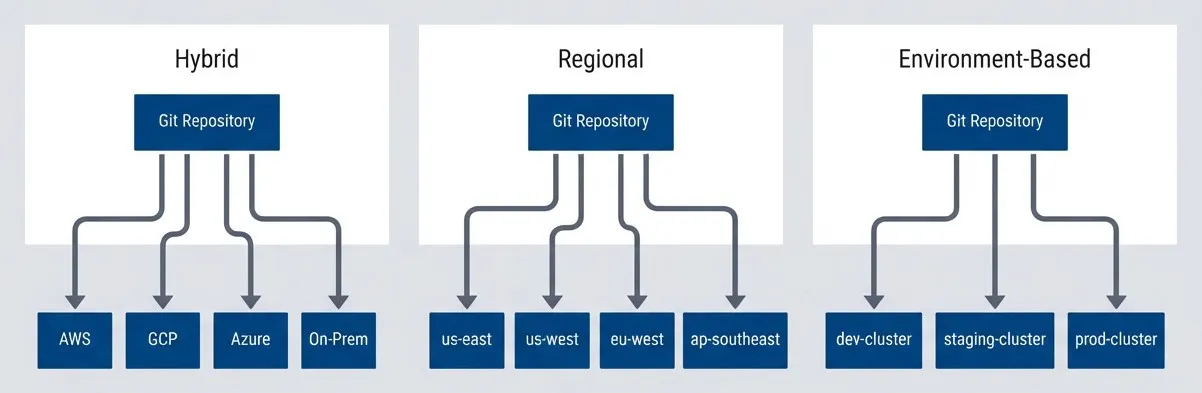
Multi-cluster topology patterns.description
Flowchart showing three common multi-cluster topology patterns. In the first grouped section, labeled Environment-Based, a Git Repository points to three clusters: dev-cluster, staging-cluster, and prod-cluster. In the second grouped section, labeled Regional, a Git Repository points to four regional clusters: us-east, us-west, eu-west, and ap-southeast. In the third grouped section, labeled Hybrid, a Git Repository points to four infrastructure targets: AWS, GCP, Azure, and On-Prem. The diagram emphasizes that the same GitOps source model can support different organizational reasons for multi-cluster deployment: separate environments, geographic regions, or mixed cloud and on-premises platforms.
Consistency vs Flexibility Spectrum
Every multi-cluster strategy sits somewhere on a spectrum from “all clusters are identical” to “each cluster is independent.” Neither extreme works well in practice.
- 1Fully consistent
Means all clusters get exactly the same configuration. This is simple to reason about and guarantees reproducibility, but it’s inflexible. You end up over-provisioning dev and staging to match production, or you can’t tune production for its actual load patterns. This approach only works for small fleets with simple applications.
- 2Layered configuration
Uses a base configuration with environment-specific overrides. This is the sweet spot for most organizations. You define what’s shared (security policies, monitoring stack, core add-ons) and what varies (replica counts, resource limits, feature flags). Kustomize overlays and Helm values files are the typical implementation. The risk is “override explosion”—so many layers of patches that nobody can trace what a cluster actually runs.
- 3Policy-governed
Configuration sets guardrails rather than identical configs. Teams can customize their clusters within bounds enforced by OPA/Gatekeeper1 or Kyverno2. This enables innovation and team autonomy, but drift happens within the policy bounds. Debugging becomes harder because clusters are intentionally different.
- 4Fully flexible
Means each cluster is independent, with its own GitOps repo and configuration. Maximum autonomy, maximum chaos. Security risks emerge when teams deviate from baselines. This only works with truly autonomous teams who don’t need cross-cluster consistency.
| Approach | Consistency | Flexibility | Operational Overhead | Best For |
|---|---|---|---|---|
| Fully Consistent | Very High | Very Low | Low | Small fleet, simple apps |
| Layered Config | High | Medium | Medium | Typical enterprise |
| Policy Governed | Medium | High | High | Platform teams, multi-tenant |
| Fully Flexible | Low | Very High | Variable | Autonomous teams |
Most organizations land on “layered configuration” with policy guardrails. Pure consistency is too rigid; pure flexibility is chaos. The middle ground — shared base with controlled overrides — balances predictability with practicality.
Fleet Management Tools
The fleet management landscape has matured around a few dominant approaches. All of them embrace GitOps — storing desired state in Git and reconciling clusters toward that state — but they differ in how they handle multi-cluster targeting, configuration layering, and operational visibility.
Tool Comparison
- ArgoCD ApplicationSetsExtends ArgoCD's Application concept with generators that create Applications dynamically based on clusters, Git directories, or custom lists. If you're already running ArgoCD, ApplicationSets are the natural choice. The generator patterns (cluster, list, git, matrix, merge) handle most multi-cluster scenarios elegantly. The limitation is scale: beyond 500 clusters, the ApplicationSet controller can struggle, and you'll need sharding or multiple ArgoCD instances.
- FluxTakes a different approach, building multi-cluster support into its Kustomization hierarchy. Each cluster runs its own Flux controllers pulling from Git, with dependencies between Kustomizations enabling layered configuration. Flux excels at lightweight, distributed deployments where each cluster is fairly autonomous. The trade-off is less centralized visibility — there's no built-in UI showing fleet-wide status.
- Rancher FleetProvides centralized multi-cluster GitOps with a strong UI for fleet visibility. The "bundle" concept groups related resources for deployment across cluster groups. It's pull-based (clusters pull their configs), but the Rancher UI gives operators a single pane of glass. The downside is ecosystem lock-in — Fleet integrates deeply with Rancher's cluster management.
- Google Config Sync (part of Anthos)Offers deep GKE integration with built-in policy controller and namespace hierarchy management. If your fleet is GKE-centric, Config Sync provides tight integration with Google Cloud's IAM and audit logging. For multi-cloud or on-prem clusters, it's less flexible.
- CrossplaneApproaches fleet management differently — as a Kubernetes-native control plane extension for both infrastructure and configuration. You define Compositions that abstract cluster provisioning and configuration together. This is powerful for platform teams building internal developer platforms, but the learning curve is steep.
| Tool | Model | Best For | Scale Ceiling | Learning Curve |
|---|---|---|---|---|
| ArgoCD ApplicationSets | Pull-based, centralized | Teams already using ArgoCD | ~500 clusters | Medium |
| Flux | Pull-based, distributed | CLI-first, GitOps-native teams | 1000+ clusters | Medium-High |
| Rancher Fleet | Pull-based, central UI | Rancher ecosystem users | ~500 clusters | Low-Medium |
| Config Sync | Pull-based, GKE-native | GKE-centric organizations | GKE limits | Low |
Crossplane deserves mention but serves a different purpose — it’s a control plane for provisioning infrastructure and configuration together, not purely a fleet deployment tool. If you’re building an internal developer platform where cluster provisioning and app deployment are unified, Crossplane is worth evaluating. For pure configuration management across existing clusters, stick with the GitOps tools above.
ArgoCD ApplicationSets
ApplicationSets are ArgoCD’s answer to multi-cluster deployment. The core concept is a generator that produces a list of parameters, combined with a template that stamps out Applications using those parameters. The cluster generator is the most common — it queries ArgoCD’s cluster secrets and creates one Application per matching cluster.
The example below deploys platform services across all production and staging clusters. The cluster generator selects clusters by label (env: production or env: staging), and the template creates Applications that pull from different Git branches based on environment. Each cluster’s Application syncs from a cluster-specific path in the repository.
apiVersion: argoproj.io/v1alpha1
kind: ApplicationSet
metadata:
  name: platform-services
  namespace: argocd
spec:
  generators:
    - clusters:
        selector:
          matchLabels:
            env: production
        values:
          revision: main
    - clusters:
        selector:
          matchLabels:
            env: staging
        values:
          revision: staging
  template:
    metadata:
      name: "platform-services-{{name}}"
      labels:
        env: "{{metadata.labels.env}}"
        region: "{{metadata.labels.region}}"
    spec:
      project: platform
      source:
        repoURL: https://github.com/org/platform-config
        targetRevision: "{{values.revision}}"
        path: "clusters/{{name}}/platform-services"
        kustomize:
          patches:
            - target:
                kind: Deployment
              patch: |
                - op: replace
                  path: /spec/replicas
                  value: {{metadata.labels.replicas}}
      destination:
        server: "{{server}}"
        namespace: platform-services
      syncPolicy:
        automated:
          prune: true
          selfHeal: true
        syncOptions:
          - CreateNamespace=true
- PrunePropagationPolicy=foregroundThe magic is in the cluster labels. ArgoCD stores cluster connection details as Kubernetes Secrets with special labels. The cluster generator reads these secrets, extracts both connection info and custom labels, then passes them to the template. You can embed cluster-specific values (like replica counts) directly in the cluster secret’s labels, making the ApplicationSet template fully generic.
apiVersion: v1
kind: Secret
metadata:
  name: us-east-prod
  namespace: argocd
  labels:
    argocd.argoproj.io/secret-type: cluster
    env: production
    region: us-east
    replicas: "5"
type: Opaque
stringData:
  name: us-east-prod
  server: https://us-east-prod.k8s.example.com
# config contains bearerToken and tlsClientConfig (omitted for brevity)Flux Multi-Cluster
Flux takes a fundamentally different approach: instead of a central controller generating Applications, each cluster runs its own Flux controllers that pull configuration from Git. Multi-cluster management emerges from how you structure your Git repository and how Flux Kustomizations depend on each other.
The key abstraction is the Flux Kustomization (not to be confused with Kustomize’s kustomization.yaml—Flux borrowed the name but it’s a different resource). A Flux Kustomization points to a path in a Git repository and reconciles those manifests to the cluster. The dependsOn field creates ordering: base configs apply first, then environment overlays, then cluster-specific configs.
# Base Kustomization applied to all clusters
apiVersion: kustomize.toolkit.fluxcd.io/v1
kind: Kustomization
metadata:
  name: platform-base
  namespace: flux-system
spec:
  interval: 10m
  sourceRef:
    kind: GitRepository
    name: platform-config
  path: ./base/platform
  prune: true
---
# Environment-specific overlay
apiVersion: kustomize.toolkit.fluxcd.io/v1
kind: Kustomization
metadata:
  name: platform-production
  namespace: flux-system
spec:
  interval: 10m
  dependsOn:
    - name: platform-base
  sourceRef:
    kind: GitRepository
    name: platform-config
  path: ./overlays/production
  prune: true
  patches:
    - patch: |
        - op: replace
          path: /spec/replicas
          value: 5
      target:
        kind: Deployment
        labelSelector: "tier=platform"
---
# Cluster-specific configuration
apiVersion: kustomize.toolkit.fluxcd.io/v1
kind: Kustomization
metadata:
  name: cluster-config
  namespace: flux-system
spec:
  interval: 10m
  dependsOn:
    - name: platform-production
  sourceRef:
    kind: GitRepository
    name: platform-config
  path: ./clusters/${CLUSTER_NAME}
  prune: true
  postBuild:
    substituteFrom:
      - kind: ConfigMap
        name: cluster-vars
      - kind: Secret
name: cluster-secretsThe repository structure mirrors the Kustomization hierarchy. Base configurations define the canonical resources. Environment overlays patch those resources for dev/staging/production. Cluster-specific directories handle the last-mile customization — things like cluster-specific ingress hostnames or region-specific resource limits. The postBuild.substituteFrom feature lets you inject cluster-specific values from ConfigMaps or Secrets at reconciliation time, avoiding the need to duplicate paths for every cluster.
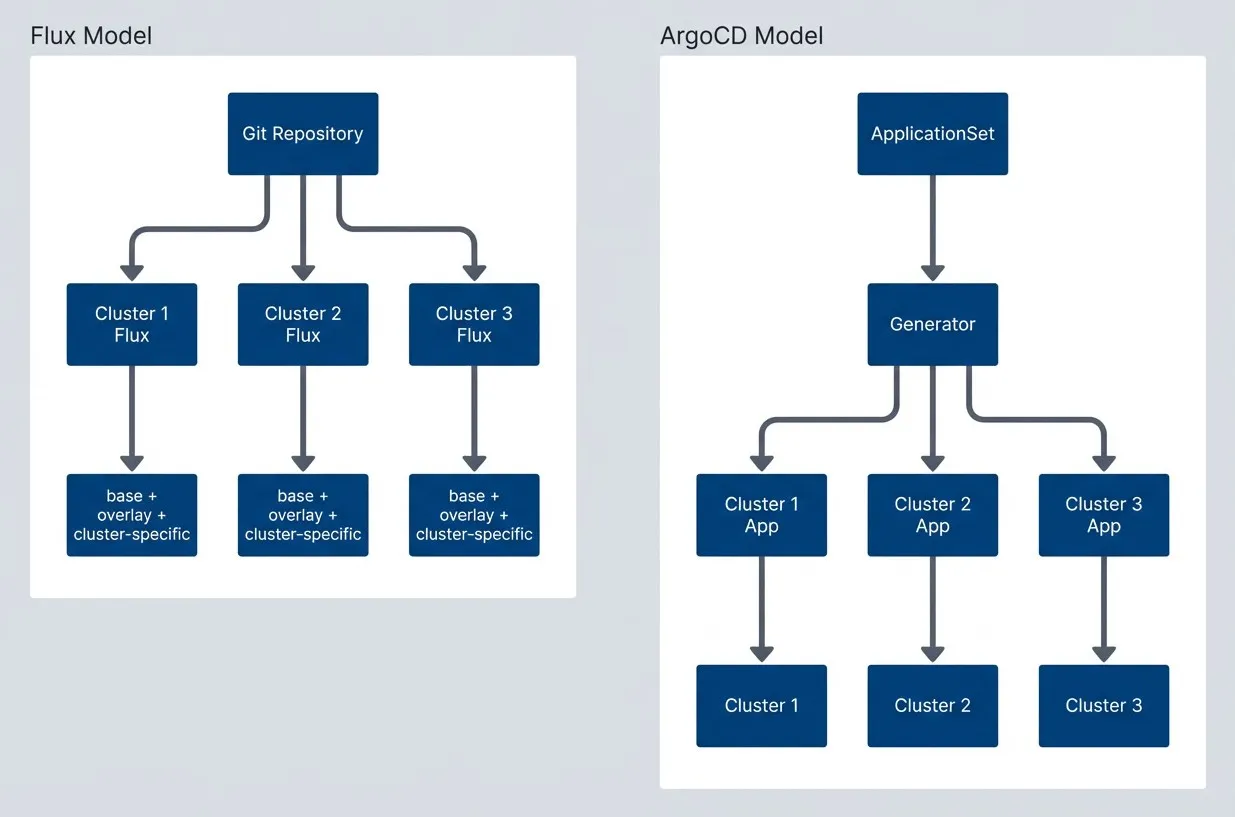
ArgoCD generates Applications centrally - Flux controllers pull independently.description
Flowchart comparing the ArgoCD and Flux multi-cluster operating models. In the grouped section labeled ArgoCD Model, ApplicationSet points to Generator, which then fans out to Cluster 1 App, Cluster 2 App, and Cluster 3 App. Each of those generated applications points to a corresponding cluster: Cluster 1, Cluster 2, and Cluster 3. In the grouped section labeled Flux Model, a shared Git Repository points directly to Cluster 1 Flux, Cluster 2 Flux, and Cluster 3 Flux. Each cluster-specific Flux controller then points to its own layered configuration composed of base plus overlay plus cluster-specific settings. The diagram highlights that ArgoCD centralizes application generation before deployment, while Flux distributes reconciliation to controllers running inside each cluster, all pulling from the same repository.
ArgoCD ApplicationSets excel at generating many similar applications with cluster-specific values. Flux’s Kustomization hierarchy excels at layered configuration with clear inheritance. Choose based on your team’s mental model.
Configuration Templating
Once you’ve chosen a fleet management tool, the next decision is how to generate cluster-specific configurations from shared definitions. The fleet tool handles where configs deploy; the templating strategy handles what varies between clusters.
The two dominant approaches are Kustomize (patch-based) and Helm (template-based), though alternatives like Jsonnet3 and CUE4 exist for organizations with more complex needs.
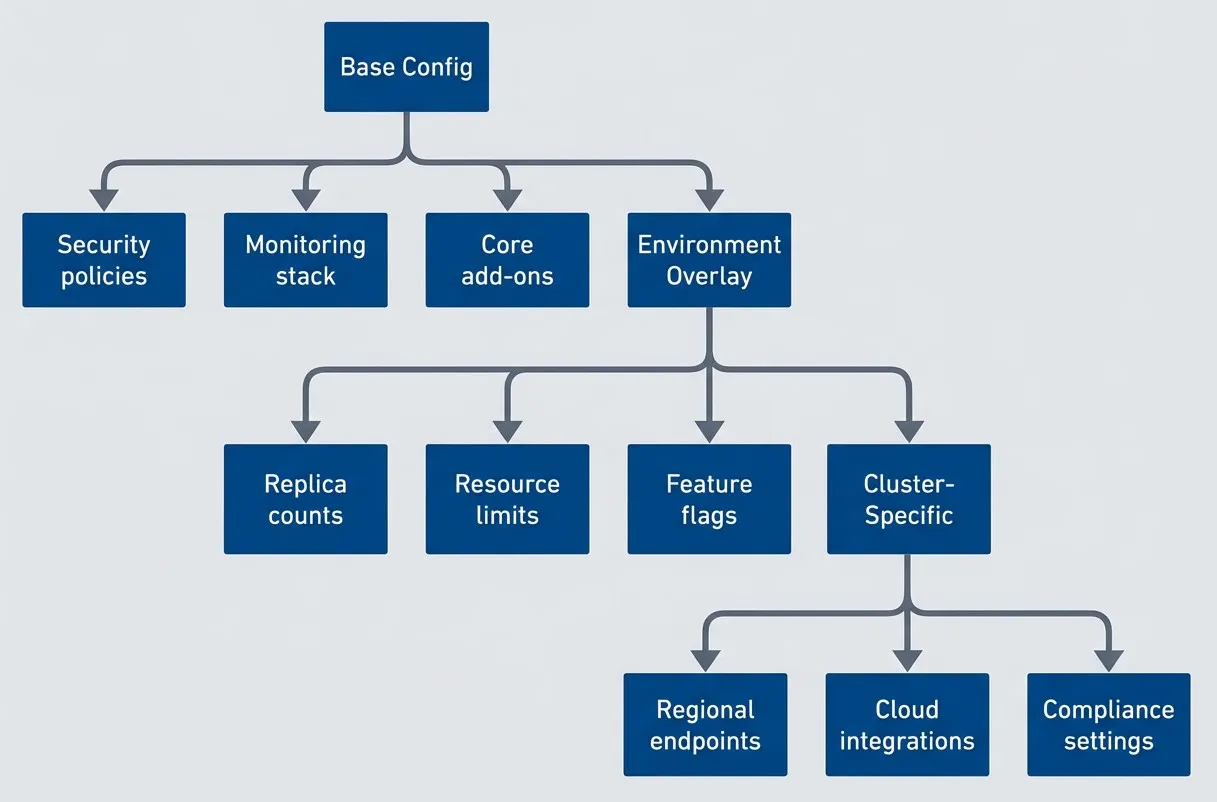
Configuration layering from fleet-wide to cluster-specific.description
Flowchart showing a three-layer configuration model for multi-cluster fleets. Inside a grouped section labeled Configuration Layering, Base Config points to Security policies, Monitoring stack, and Core add-ons. Environment Overlay points to Replica counts, Resource limits, and Feature flags. Cluster-Specific points to Regional endpoints, Cloud integrations, and Compliance settings. Outside those branch relationships, Base Config points to Environment Overlay, and Environment Overlay points to Cluster-Specific, showing that the layers build on one another from shared fleet-wide defaults to environment-level overrides and finally to per-cluster customization. The diagram illustrates how organizations can preserve consistency while still allowing necessary differences between environments and individual clusters.
Kustomize for Multi-Cluster
Kustomize uses a layered approach: a base directory contains canonical manifests, and overlay directories patch those manifests for specific environments or clusters. There’s no templating — just strategic merge patches and JSON patches that modify the base resources.
The typical structure has three layers: base (shared across all clusters), environment overlays (development, staging, production), and cluster-specific overlays for last-mile customization. Each layer’s kustomization.yaml references the previous layer and adds patches.
# Base configuration (base/kustomization.yaml)
apiVersion: kustomize.config.k8s.io/v1beta1
kind: Kustomization
resources:
  - namespace.yaml
  - deployment.yaml
  - service.yaml
  - configmap.yaml
commonLabels:
app.kubernetes.io/managed-by: fleetThe production overlay references the base and layers on deployment-specific settings — replica counts, pinned image tags, resource requests and limits, and merged ConfigMap values. Kustomize’s patches field uses JSON Patch operations to surgically modify individual fields without rewriting the entire manifest.
# Production overlay (overlays/production/kustomization.yaml)
apiVersion: kustomize.config.k8s.io/v1beta1
kind: Kustomization
resources:
  - ../../base
namePrefix: prod-
replicas:
  - name: api-server
    count: 5
images:
  - name: api-server
    newTag: v2.1.0
patches:
  - target:
      kind: Deployment
      name: api-server
    patch: |
      - op: add
        path: /spec/template/spec/containers/0/resources
        value:
          requests:
            cpu: "500m"
            memory: "512Mi"
          limits:
            cpu: "2000m"
            memory: "2Gi"
configMapGenerator:
  - name: app-config
    behavior: merge
    literals:
      - LOG_LEVEL=info
- ENABLE_DEBUG=falseThe final layer targets a specific cluster. It references the production overlay and adds region-aware patches — injecting the correct database endpoint and constraining pod scheduling to the matching availability zone via nodeSelector.
# Cluster-specific (clusters/us-east-prod/kustomization.yaml)
apiVersion: kustomize.config.k8s.io/v1beta1
kind: Kustomization
resources:
  - ../../overlays/production
patches:
  - target:
      kind: ConfigMap
      name: app-config
    patch: |
      - op: add
        path: /data/REGION
        value: us-east-1
      - op: add
        path: /data/DB_HOST
        value: us-east-prod.db.example.com
  - target:
      kind: Deployment
      name: api-server
    patch: |
      - op: replace
        path: /spec/template/spec/nodeSelector
        value:
topology.kubernetes.io/region: us-east-1The advantage of Kustomize is that there’s no templating language to learn — it’s native Kubernetes YAML with patches. The disadvantage is that complex transformations require many patches, and the final rendered output isn’t obvious from reading the source files.
Helm with Fleet Values
Helm takes the opposite approach: templates with variable substitution. A single chart can deploy to any cluster by providing different values files. For fleet management, you layer values files just like Kustomize overlays: base values, environment values, cluster-specific values.
# Base values (values/base.yaml)
replicaCount: 2
image:
  repository: myapp/api
  tag: latest
  pullPolicy: IfNotPresent
resources:
  requests:
    cpu: 100m
    memory: 128Mi
config:
  logLevel: debug
enableMetrics: trueThe production values file overrides the base defaults with deployment-grade settings — higher replica counts, a pinned image tag, explicit resource limits, and a PodDisruptionBudget to maintain availability during rolling updates.
# Production values (values/production.yaml)
replicaCount: 5
image:
  tag: v2.1.0
  pullPolicy: Always
resources:
  requests:
    cpu: 500m
    memory: 512Mi
  limits:
    cpu: 2000m
    memory: 2Gi
config:
  logLevel: info
  enableMetrics: true
podDisruptionBudget:
  enabled: true
minAvailable: 3The cluster-specific file adds the final layer of customization — scaling replicas for a high-traffic region, wiring in the regional database endpoint, and using nodeSelector and tolerations to pin workloads to dedicated node pools.
# Cluster-specific values (values/clusters/us-east-prod.yaml)
replicaCount: 8  # Higher traffic region
config:
  region: us-east-1
  dbHost: us-east-prod.db.example.com
nodeSelector:
  topology.kubernetes.io/region: us-east-1
tolerations:
  - key: "dedicated"
    operator: "Equal"
    value: "api"
effect: "NoSchedule"Helmfile orchestrates this layering, merging values files in order and injecting environment variables for cluster-specific paths.
environments:
  development:
    values:
      - values/development.yaml
  staging:
    values:
      - values/staging.yaml
  production:
    values:
      - values/production.yaml

releases:
  - name: api-server
    namespace: production
    chart: ./charts/api-server
    values:
      - values/base.yaml
      - values/{{ .Environment.Name }}.yaml
- values/clusters/{{ requiredEnv "CLUSTER_NAME" }}.yamlThe key thing to get right with layered values is merge order. Helm performs a shallow merge by default, so nested maps in a later values file replace — rather than merge with — the same key from an earlier file. If your base defines resources.requests.cpu and a cluster file only sets resources.requests.memory, you lose the CPU request entirely. Use Helmfile’s mergeStrategy: strategic or restructure values to keep overrides at leaf keys to avoid silent misconfigurations that only surface under load.
| Approach | Pros | Cons | Best For |
|---|---|---|---|
| Kustomize overlays | Native K8s, no templating | Patch complexity grows | Simple environment overrides |
| Helm values hierarchy | Powerful templating | Values file explosion | Complex apps with many variants |
| Jsonnet | Programmable, DRY | Steep learning curve | Large-scale platforms |
| CUE | Type-safe, validation | Newer, less ecosystem adoption | Configuration validation focus |
The “values file explosion” problem is real: base + environment + region + cluster = many files to manage. Combat this with clear naming conventions, validation in CI, and documentation of which values are set where.
Drift Detection and Prevention
Drift — the divergence between desired state in Git and actual state in clusters — is the silent killer of fleet consistency. It happens gradually: a hotfix applied directly to production, a debugging session that left a ConfigMap modified, an operator who “just needed to bump the replica count.” Each change seems harmless, but they accumulate until your fleet is a collection of undocumented variations that nobody fully understands.
Detecting Configuration Drift
GitOps tools provide built-in drift detection. ArgoCD compares the rendered manifests from Git against the live cluster state on every sync interval (default 3 minutes). When they differ, the Application shows as “OutOfSync” in the UI and emits metrics. Flux does the same comparison through its reconciliation loop, surfacing drift through the Ready condition on Kustomization resources.
The key configuration choice is whether to detect drift or auto-remediate it. ArgoCD’s selfHeal: true setting automatically reverts any manual changes, forcing the cluster back to the Git-defined state. This is powerful for preventing drift but can be dangerous if someone made a legitimate emergency change.
apiVersion: argoproj.io/v1alpha1
kind: Application
metadata:
  name: platform-services
spec:
  syncPolicy:
    automated:
      prune: true      # Delete resources removed from Git
      selfHeal: true   # Revert manual changes automatically
    syncOptions:
- Validate=true # Validate manifests before applyingFor fleet-wide visibility, export drift metrics to your monitoring system. ArgoCD exposes argocd_app_info metrics with sync status labels. Flux exposes reconciliation status through gotk_reconcile_condition. Build dashboards that show drift across all clusters at a glance, and alert when clusters stay out-of-sync for more than a few reconciliation cycles.
# ArgoCD: count of out-of-sync applications by cluster
count by (dest_server) (argocd_app_info{sync_status="OutOfSync"})

# Flux: count of failed reconciliations by cluster
count by (exported_namespace) (gotk_reconcile_condition{type="Ready", status="False"})Policy-Based Prevention
Detection tells you when drift happens; prevention stops it from happening in the first place. Kubernetes admission controllers can intercept API requests before resources are created or modified, rejecting changes that violate fleet policies.
The two main policy engines are OPA/Gatekeeper and Kyverno. For drift prevention, the common patterns are:
- 1Require fleet management labelsReject resources that lack labels indicating they're fleet-managed. This catches resources created outside the GitOps flow.
- 2Require GitOps annotationsReject modifications to resources that should only be changed through Git. ArgoCD adds tracking annotations; policies can require their presence.
- 3Restrict manual changes in productionAllow direct kubectl access in dev/staging but block it in production namespaces.
Here’s a Gatekeeper constraint that requires fleet management labels on all workloads:
apiVersion: templates.gatekeeper.sh/v1
kind: ConstraintTemplate
metadata:
  name: k8srequiredlabels
spec:
  crd:
    spec:
      names:
        kind: K8sRequiredLabels
      validation:
        openAPIV3Schema:
          type: object
          properties:
            labels:
              type: array
              items:
                type: string
  targets:
    - target: admission.k8s.gatekeeper.sh
      rego: |
        package k8srequiredlabels
        violation[{"msg": msg}] {
          provided := {label | input.review.object.metadata.labels[label]}
          required := {label | label := input.parameters.labels[_]}
          missing := required - provided
          count(missing) > 0
          msg := sprintf("Missing required labels: %v", [missing])
        }
---
apiVersion: constraints.gatekeeper.sh/v1beta1
kind: K8sRequiredLabels
metadata:
  name: fleet-managed-resources
spec:
  match:
    kinds:
      - apiGroups: ["apps"]
        kinds: ["Deployment", "StatefulSet", "DaemonSet"]
  parameters:
    labels:
      - "app.kubernetes.io/managed-by"
- "fleet.example.com/cluster"And a Kyverno policy that rejects changes to resources without GitOps annotations:
apiVersion: kyverno.io/v1
kind: ClusterPolicy
metadata:
  name: require-gitops-annotation
spec:
  validationFailureAction: Enforce
  background: true
  rules:
    - name: check-gitops-source
      match:
        any:
          - resources:
              kinds:
                - Deployment
                - Service
                - ConfigMap
              namespaces:
                - production
      validate:
        message: "Resources in production must be managed by GitOps."
        pattern:
          metadata:
            annotations:
argocd.argoproj.io/tracking-id: "*"Drift prevention through admission control is powerful but can block emergency changes. Always have a break-glass procedure — a way for authorized users to make manual changes in emergencies, with automatic detection and follow-up.
Operational Patterns
Day-to-day fleet management involves two distinct challenges: rolling out changes across clusters safely, and performing fleet-wide operations when something goes wrong. Both require thinking about ordering, verification, and rollback.
Progressive Rollout Across Fleet
Never deploy to all production clusters simultaneously. A bad configuration change, a broken image tag, a misconfigured resource limit — any of these can take down your entire fleet if deployed everywhere at once. Progressive rollout deploys to clusters in waves, verifying health between each wave.
The typical wave structure is:
- 1Canary clusterA single non-critical cluster (or a dedicated canary) that receives changes first. If something breaks, the blast radius is minimal.
- 2Non-critical productionSecondary regions, lower-traffic clusters, or less critical workloads. These validate the change works at production scale without risking your primary clusters.
- 3Primary productionThe clusters that matter most. By the time changes reach here, they've been validated in real production conditions.
ArgoCD’s ApplicationSet supports progressive rollout through its RollingSync strategy. You assign wave labels to clusters and define steps that sync clusters matching each wave:
apiVersion: argoproj.io/v1alpha1
kind: ApplicationSet
metadata:
  name: platform-progressive-rollout
spec:
  generators:
    - list:
        elements:
          - cluster: canary-cluster
            wave: "1"
          - cluster: prod-secondary
            wave: "2"
          - cluster: prod-primary
            wave: "3"
  strategy:
    type: RollingSync
    rollingSync:
      steps:
        - matchExpressions:
            - key: wave
              operator: In
              values: ["1"]
        - matchExpressions:
            - key: wave
              operator: In
              values: ["2"]
          maxUpdate: 1
        - matchExpressions:
            - key: wave
              operator: In
              values: ["3"]
  template:
    metadata:
      name: "platform-{{cluster}}"
      labels:
        wave: "{{wave}}"
    spec:
      source:
        repoURL: https://github.com/org/platform-config
        path: "clusters/{{cluster}}"
      destination:
        server: "{{server}}"
        namespace: platform
      syncPolicy:
        automated:
selfHeal: trueBetween waves, you need automated verification. Argo Rollouts’ AnalysisTemplates can query Prometheus for error rates and latency, automatically blocking progression if metrics exceed thresholds:
apiVersion: argoproj.io/v1alpha1
kind: AnalysisTemplate
metadata:
  name: fleet-rollout-check
spec:
  metrics:
    - name: error-rate
      interval: 1m
      successCondition: result[0] < 0.01
      provider:
        prometheus:
          address: http://prometheus:9090
          query: |
            sum(rate(http_requests_total{status=~"5.*",cluster="{{args.cluster}}"}[5m]))
            /
            sum(rate(http_requests_total{cluster="{{args.cluster}}"}[5m]))
    - name: latency-p99
      interval: 1m
      successCondition: result[0] < 500
      provider:
        prometheus:
          address: http://prometheus:9090
          query: |
            histogram_quantile(0.99,
              sum(rate(http_request_duration_seconds_bucket{cluster="{{args.cluster}}"}[5m])) by (le)
) * 1000Fleet-Wide Operations
Sometimes you need to perform operations across the entire fleet that don’t fit the GitOps model: emergency patching, fleet-wide debugging, state comparison, or coordinated restarts. For these, you need operational tooling that understands cluster ordering and can handle failures gracefully.
The key principles are:
- 1Order by criticalityOperate on canary/dev clusters first, production last. If something fails, you find out before touching critical infrastructure.
- 2Verify between clustersDon't blindly proceed. Check health, validate the operation succeeded, wait for stabilization.
- 3Have a rollback planKnow how to undo the operation. For some operations (like config changes), rollback is straightforward. For others (like data migrations), it's not.
- 4Respect rate limitsDon't hammer your clusters. Add delays between operations, especially in production.
| Operation Type | Strategy | Verification | Rollback |
|---|---|---|---|
| Security patch | Parallel (all at once) | Basic health | Per-cluster |
| Feature rollout | Progressive waves | Canary metrics | Full fleet |
| Config change | Sequential | Config validation | Previous config |
| Add-on upgrade | Progressive | Integration tests | Previous version |
Progressive rollout is essential for production fleet operations. Start with a canary cluster, verify health, then proceed to non-critical clusters, and finally critical clusters. Each wave should have clear success criteria before proceeding.
Conclusion
The shift from Kubernetes Federation to GitOps-based fleet management reflects a fundamental insight: multi-cluster consistency isn’t about making clusters identical, it’s about making differences intentional and documented. Federation failed because it tried to abstract away cluster variations. Modern fleet tools succeed because they embrace variations while providing guardrails.
The practical path forward has four components. First, document your fleet topology explicitly — which clusters exist, what each serves, what should be shared versus different. This documentation becomes the foundation for your templating strategy, whether you choose Kustomize overlays or Helm values hierarchies.
Second, choose tools that match how your team thinks. ArgoCD ApplicationSets work well if you think in terms of “deploy this app to these clusters.” Flux’s Kustomization hierarchy fits teams who think in terms of “base config plus environment overrides plus cluster-specific tweaks.” Fighting your team’s mental model leads to workarounds that undermine the system.
Third, implement drift detection from day one, before clusters have had time to diverge. The choice between auto-remediation and alert-and-review depends on your risk tolerance — auto-heal everything in dev, be more cautious in production. Either way, you need visibility into what’s drifting and why.
Finally, treat fleet-wide changes as first-class operations with their own patterns: progressive rollout through canary clusters, automated verification between waves, and clear rollback procedures. The overhead of wave-based deployment pays for itself the first time it catches a bad change before it reaches your primary production clusters.
Fleet management maturity is measured by how confidently you can answer: “What’s different between these clusters, and is that difference intentional?” If you can’t answer quickly, start with documentation. Tools amplify good processes; they can’t substitute for them.
One area this article hasn’t covered in depth is secrets management across clusters — synchronizing credentials, certificates, and API keys while maintaining proper access controls. Tools like External Secrets Operator, Sealed Secrets, and HashiCorp Vault each solve this differently. That’s a topic for its own deep dive.
Footnotes
-
OPA (Open Policy Agent) is an open-source, general-purpose policy engine that unifies policy enforcement across the stack, using a declarative language called Rego to define complex rules. Gatekeeper is a specialized project that integrates OPA into Kubernetes — it acts as a validating admission controller, intercepting requests to the Kubernetes API and checking them against OPA policies before resources are created or modified.
↩ -
Kyverno is a Kubernetes-native policy engine. Unlike Gatekeeper, it doesn’t require learning Rego; policies are written in standard YAML. It can validate, mutate (modify), and generate resources, as well as verify container image signatures.
↩ -
Jsonnet is a data templating language from Google, designed to generate JSON (and by extension, YAML). It’s a full programming language with functions, conditionals, and imports, making it powerful for complex configuration generation. The trade-off is that Jsonnet requires learning a new language, and debugging can be challenging when templates become deeply nested.
↩ -
CUE (Configure, Unify, Execute) is an open-source data constraint language designed for defining schemas and validating data. It’s a superset of JSON — any valid JSON is also valid CUE — but adds type constraints, default values, and logical unification. CUE isn’t part of Kubernetes or the CNCF, but it’s widely used in the Kubernetes ecosystem for configuration validation and generation.
↩
Sharethisarticle
Enjoyed the read? Share it with your network.